
An SMM panel is an ordering website for social-media services. SMM stands for social media marketing. You choose a service from a catalog, provide its required target and quantity, pay from an account balance and track the resulting order. Common catalog categories include views, followers and other engagement services, with different requirements for each listing.
The panel organizes the purchase. Your job is to understand exactly what the listing includes and which target link it needs. This guide follows the NotPanel buying process from choosing a service to checking the accepted order.
A panel, an ad campaign and a social-media manager do different jobs
A panel lets you place defined service orders. An advertising campaign buys placement through an advertising product. A social-media manager may plan content, publish posts, answer people and report on business goals. Buying a catalog service does not automatically include those other jobs.
Decide what you actually need before comparing prices. If your goal is more enquiries, write down how you will measure enquiries. A completed service order and a successful marketing campaign are separate results.
Read one service listing all the way through
Open the current NotPanel catalog and compare the exact listings, including their service IDs. Similar names can describe different quantities, required links, refill terms or delivery patterns.
- Target: does the service require a profile, post, video or another input?
- Quantity: is your order within this service’s minimum and maximum?
- Price: what unit does the rate use, and what final charge does the order form show?
- Timing: what average start time is available for this service?
- Conditions: what does the description say about eligibility, refills or scheduling?
NotPanel’s average start-time guide explains the timing signal: it estimates when delivery begins, which helps you choose between services. The service feedback guide explains how to read likes and dislikes alongside their vote counts.
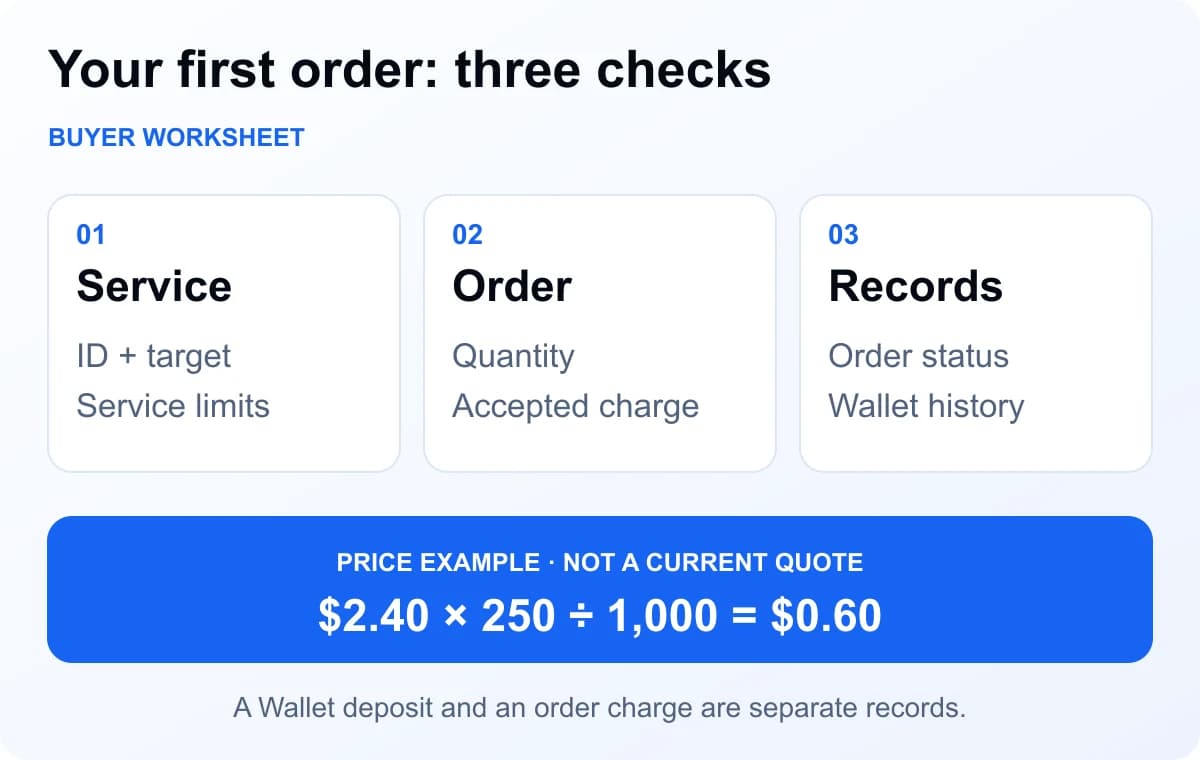
A price example you can check yourself
Suppose a listing costs $2.40 per 1,000 and accepts an order of 250 units. The simple calculation is $2.40 × 250 ÷ 1,000 = $0.60. These are example numbers. Your accepted charge comes from the current order form, including any applicable account pricing or order options.
A deposit and an order charge are different transactions. Depositing $5 funds your Wallet; it does not mean a $0.60 order costs $5. Read the payment method’s fee and amount instructions, then check that funds have reached the Wallet before placing the order.
Place a first order you can actually review
- Read the service description and open the intended target yourself.
- Choose a small quantity that the service accepts and that you can afford to test.
- Check the target, quantity and displayed charge before confirming.
- Save the order reference. Open Orders to follow its state.
- Use Wallet history to check the charge and any confirmed refund.
The dashboard links require sign-in. If something needs investigation, keep the same order reference in a support ticket. Sending another order is not a way to check whether the first one exists.
Eligible one-time orders have a 15-second cancellation window while Pending, before submission. The Refund Policy also covers eligible one-time orders still unresolved seven days after placement. Read the cancellation and refund guide before relying on a particular protection.
Compare your shortlist
Ready to compare products? Use the pre-deposit assessment guide to turn these questions into a short, recorded decision.
Beginner questions
What does SMM panel mean?
SMM means social media marketing. An SMM panel is an ordering website that lists social-media services, takes the information needed for each service and keeps orders and payments in one account.
What should I check before my first SMM panel order?
Match the platform and category to your target link. Check the service description, quantity limits, current rate and average start time, then review the order total before submitting.
Does average start time mean the whole order will finish then?
No. NotPanel’s average start time estimates when delivery begins. It helps compare services before ordering; it is not the time needed to finish the entire quantity.
Where does a NotPanel order refund go?
An eligible order refund goes to the NotPanel Wallet for future orders. It is not an automatic repayment to a bank, card or external cryptocurrency wallet. Read the Refund Policy for the rule that applies to the order.