
Start with a read-only API call, map one service, then build an order record that survives retries and restarts. That sequence gives you something more useful than a successful demo: a way to explain what happened to each customer purchase. This guide uses NotPanel’s current API contract and a small client example you can adapt in your own server application.
The key design decision is to keep three things separate: your customer’s purchase, the request used to place it, and the order returned by NotPanel. A connection can fail between those steps. If your application preserves all three identities, it can recover the result without treating every retry as another purchase.
1. Connect from your server and confirm authentication
New integrations use https://notpanel.com/api/v3. Send an HTTP POST with an application/x-www-form-urlencoded body containing key and action. The /api/v1 and /api/v2 URLs remain compatibility aliases of this current contract. You can adopt optional features without changing familiar action names.
Create and manage your key on the API page. Keep it in your server’s private configuration. Do not embed it in a public page, place it in a URL, or write full authenticated request bodies to logs. The reason for avoiding URL credentials is practical: URLs can appear in access logs and other records, as the OWASP REST security guidance explains.
Begin with action=balance or action=services. These let you check your credentials and response handling without placing an order. Use placeholders in shared examples and supply the real key only in your private runtime configuration.
2. Keep the transport helper small and the result explicit
This JavaScript example handles one request. It returns HTTP context alongside the parsed result and deliberately leaves retry decisions to the caller. A network failure or aborted request rejects the promise; catch that separately and preserve an uncertain add as unresolved. A non-JSON response also leaves the result unknown.
async function callNotPanel(apiKey, action, fields = {}, signal) {
  // Run on your server. Never put apiKey in a browser bundle.
  const response = await fetch("https://notpanel.com/api/v3", {
    method: "POST",
    headers: {
      "Content-Type": "application/x-www-form-urlencoded",
    },
    body: new URLSearchParams({ ...fields, key: apiKey, action }),
    signal,
  });

  const context = {
    httpStatus: response.status,
    correlationId: response.headers.get("X-Request-ID"),
    retryAfter: response.headers.get("Retry-After"),
    rateLimitReset: response.headers.get("X-RateLimit-Reset"),
  };

  let data;
  try {
    data = await response.json();
  } catch {
    return { kind: "unknown", ...context };
  }

  if (!response.ok || (data && typeof data.error === "string")) {
    return { kind: "error", data, ...context };
  }
  return { kind: "ok", data, ...context };
}
Supply a cancellation signal and a time budget appropriate to the action in your application. Expiring that time budget stops your wait; it does not cancel an order already accepted by the panel. Also check the body and HTTP status: a completed fetch promise does not itself mean success. That distinction is part of the Fetch response model.
Validate the shape of each successful action before using it. For example, services returns a list, balance returns money fields, and add returns an order reference. This helper is the transport layer for your integration, not a complete checkout or automatic retry loop.
3. Map service IDs and requirements before offering a purchase
Store the numeric service ID as the identifier. A display name may change or be localized; it is not a safe lookup key. The services response supports lang and exposes canonical_name and name_language so you can distinguish the displayed name from the canonical one.
Use action=services for the familiar service list. When your interface needs search or paginated discovery, use action=catalog and follow the catalog query options. Both approaches return service identifiers you can keep separate from display names.
Check the service type, minimum, maximum, and supported capabilities. A default quantity-based order is different from a package or custom-comments service. Do not send every service the same form. Use the catalog contract and place-order requirements to decide which fields your customer must supply.
Keep returned money strings as decimal values in your application’s money handling. Recheck availability and show the applicable price before purchase; a saved catalog entry is not a promise that a service or rate will remain unchanged. Preserve the charge returned for the accepted order in your own purchase record.
4. Save one request identity before placing the order
Generate request_id once per logical order, save it with the complete payload, and use it on every retry. The optional field is nonempty and at most 128 characters. idempotency_key is an accepted alias; request_id takes precedence when both are present.
Without either key, identical add requests from the same account have 60-second duplicate protection. Explicit keys let your client identify the order across a longer recovery schedule. Two intentionally separate purchases need different keys, even if their service, target, and quantity match. Keep that decision outside the retry loop and preserve it across application restarts.
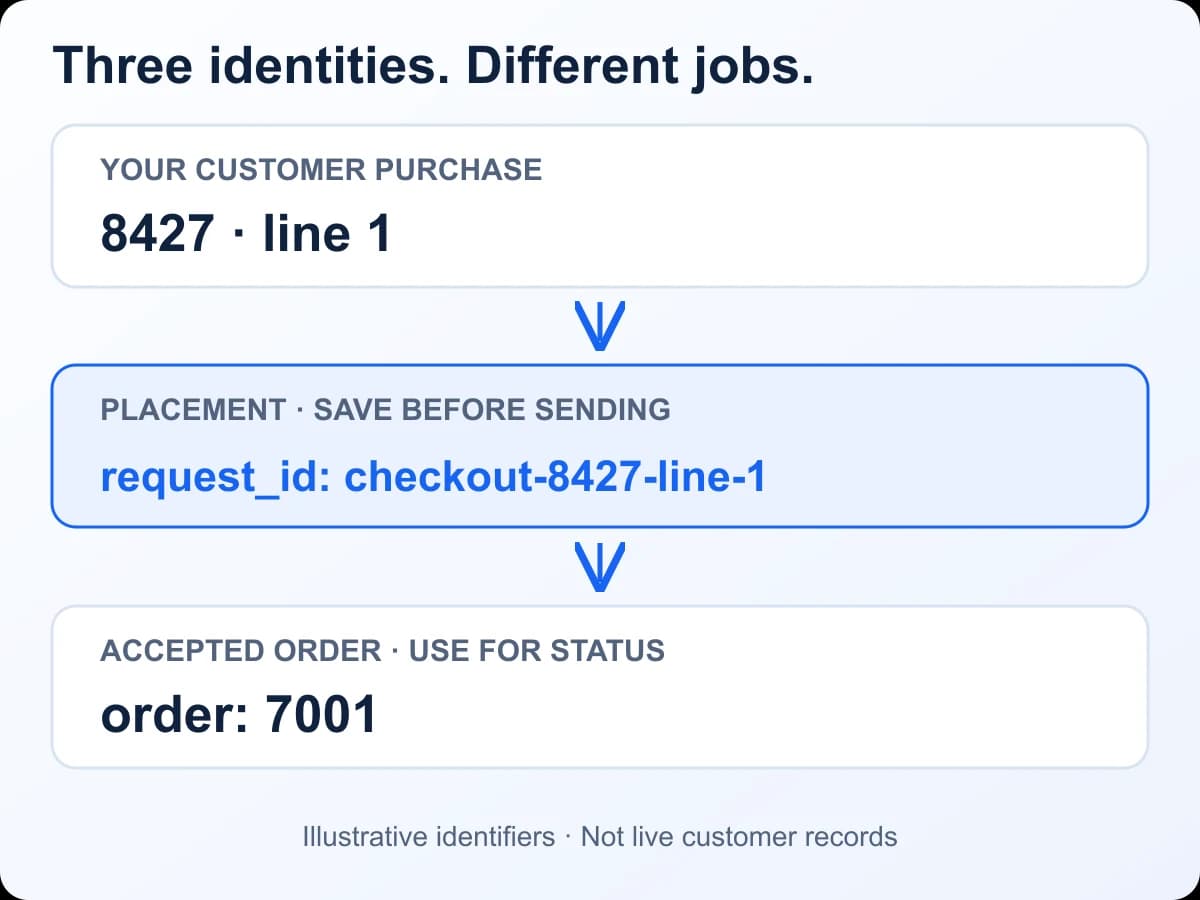
Save the returned order reference against the original purchase. If add times out, replay the same key and parameters to recover it. Processing or unconfirmed responses can ask you to wait; a key conflict means the same key was used with different details. Do not switch to a new key to force an uncertain request through. The timeout recovery guide walks through those cases.
5. Track delivery and money as separate facts
For one order, send action=status&order=7001. For a batch, send action=status&orders=7001,7002, with at most 100 IDs. These are illustrative IDs: use the references returned for your account. Check every entry in a multi-status result because one missing order can produce an item-level error.
Use status_key for logic and status for the familiar display label. Do not decide that all work is complete merely because add returned an ID. Likewise, a refunded status is not enough to reconstruct every movement in your own customer wallet.
| Field | Meaning for your integration |
|---|---|
| charge | Stored charge; it may already be the retained amount after partial settlement. |
| refund | Wallet credit already recorded for this order. |
| refund_pending_amount | Recognized refund still awaiting wallet headroom. |
| refund_quote | Use this action for original_charge, refunded, pending amount, and refundable_now. |
Do not blindly calculate charge - refund: the charge may already reflect a partial settlement, while a cancelled or refunded row can retain its original charge. Use the status field definitions and refund quote for reconciliation. For cancellation, inspect availability and the deadline, then confirm the action’s result; a local “cancelled” label does not cancel an upstream order.
6. Add events, keep reconciliation, and respect rate limits
A verified webhook receiver can update your customer view as selected events arrive. For API registrations, iterate the events array and deduplicate each event ID after signature verification. Keep status checks for recovery because events can be missed, duplicated, or delayed. The webhooks and polling guide explains where each belongs.
All of your API keys share the account’s request allowance. Creating another key does not add capacity. Read X-RateLimit-Remaining, obey Retry-After on limited requests, and treat X-RateLimit-Reset as relative seconds, not a Unix timestamp. X-RateLimit-DeniedBy, when supplied, helps identify the relevant limiter. Use the rate-limit reference instead of hard-coding one universal requests-per-minute value.
7. Prove the failure paths before launch
Test with mocks before making a real purchase. Simulate an accepted add whose response is lost, restart the client, and confirm the same request ID is reused. Simulate a key conflict, a rate-limit response, and an invalid JSON response. Each should produce an explicit recoverable or reviewable state in your application.
Then test a mixed-success status batch and the same webhook event twice. Confirm that one bad entry does not discard the rest of the batch and one duplicate event does not repeat a customer update. Keep a concise support trail with the action, time, HTTP status, error code, and X-Request-ID correlation ID where available. Redact the API key and private customer details. That correlation ID is a diagnostic reference; it is separate from your placement request_id.
For a final live check, use a small order you actually intend to purchase. Verify its returned reference, the order view, and the wallet entry. Passing a mocked retry test proves your client’s behaviour; the live check verifies the configured connection and the actual service you selected.
Frequently asked questions
Which NotPanel API URL should a new integration use?
Use https://notpanel.com/api/v3 with form-encoded POST requests. The familiar key and action fields remain. The /api/v1 and /api/v2 paths are compatibility aliases of the current contract.
Is request_id mandatory?
No. request_id and the idempotency_key alias are optional. Without either, identical add requests from one account receive 60-second duplicate protection. Persist an explicit key for each logical order when you control the client.
Does an HTTP 200 mean every item in a batch succeeded?
No. Multi-status results are keyed by order ID and individual entries can contain an error. Validate each entry instead of treating the entire batch as a single successful order result.
Do I need webhooks before I can launch?
No. Batched polling is a valid starting point. Add a verified, durable webhook receiver when ready, and retain status checks to reconcile missing or delayed events.
Can I calculate a refund by subtracting refund from charge?
Do not assume that calculation is valid. charge may already be a retained amount after partial settlement, while refund records wallet credit. Use refund_quote and its original_charge, refunded, refund_pending_amount, and refundable_now fields for reconciliation.
Continue with the API reference for action details or the v3 compatibility guide when moving an existing reseller client to NotPanel.