
To compare SMM prices, work out the charge for your quantity, your selected service and your account. Then check payment fees separately. A per-1,000 catalog rate, the money needed to top up a Wallet and the charge for one order are three different amounts.
This guide follows a small hypothetical purchase through those steps. The arithmetic is illustrative; use the current service and payment instructions for a real quote. If you are new to ordering, the beginner's guide to SMM panels explains the wider workflow.
Start with the rate basis and the quantity you need
For a standard quantity-based service priced per 1,000, the calculation is: effective rate × quantity ÷ 1,000. If the rate is $2 per 1,000 and the quantity is 500, the charge is $1. That example assumes 500 is within the service's limits and the selected order does not require a different quantity setup.
The denominator matters. “$2” on a per-1,000 row is not $2 per order or $2 per single unit. For drip-feed, check the quantity in each run and the total schedule. For services with extra inputs, use the applicable form and review its price summary rather than treating every service as one ordinary purchase.
Use your account's effective price
The public catalog is useful for browsing current services and base rates. When you sign in, account pricing can change the rate available to you. NotPanel supports general account adjustments and adjustments for particular services; a service-specific adjustment can take priority over the general one.
Discounts are also subject to the service's minimum permitted price. Treat a discount allowance as up to that percentage, and read the effective rate on the service you select. Applying a remembered account percentage to every public rate can give you the wrong budget.
In New Order, check the service, quantity and price summary together before submitting. The accepted order charge is the reference for that purchase. A later catalog price change does not turn an old screenshot into the current quote, or change the original price of an already accepted order. Dashboard links require sign-in.
Separate the top-up from the order
A Wallet top-up adds spending balance. It does not mean that the whole amount is charged to your next order. Where the selected method charges a processing fee, NotPanel's deposit form separates the Wallet amount, fee and total to pay. Review the final invoice instructions, including the currency, network or payment reference required by that method.
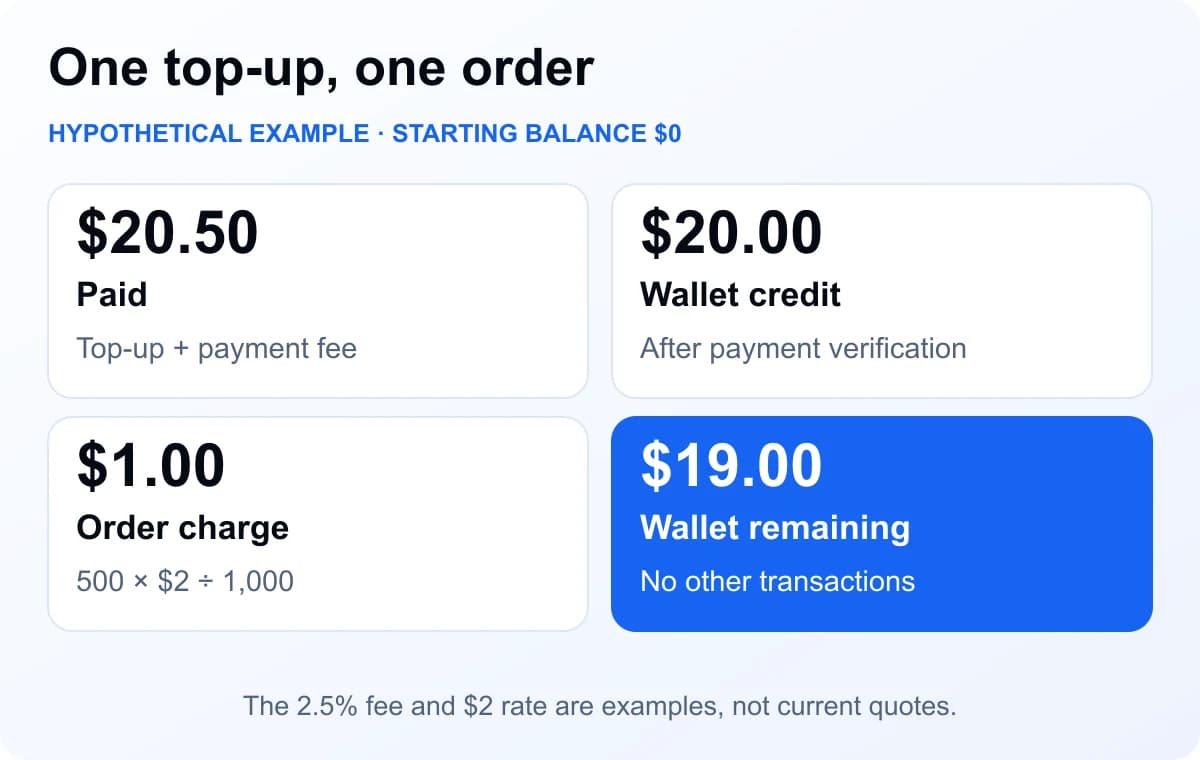
Suppose you start with a $0 Wallet, request a $20 credit and choose a method with a hypothetical 2.5% fee. The fee is $0.50, making the total payment $20.50. After the payment is verified and $20 is credited, the example $1 order leaves $19 in Wallet, assuming there are no other transactions.
Do not subtract a quoted fee yourself and send a smaller payment. Pay the amount required by the current instructions. If a payment was made but the expected Wallet credit has not appeared, use the payment-support guidance with your payment reference and the amount sent.
Where a reseller's markup fits
A reseller may pay one price for a service and quote another to a customer. The gap has to support the reseller's own business costs. It is not a disclosure of the panel's private costs, and a high or low public rate does not reveal how many suppliers are involved.
Take a separate hypothetical example: a reseller buys an order for $4 and sells it for $5. The difference is $1. That is a 25% markup on the $4 cost, but a 20% gross margin on the $5 sale. Those percentages describe the same $1 from different starting amounts.
The $1 is still before payment fees, support time, any customer remedies and fixed business expenses. For a practical way to include those costs, use the worksheet in our 30-day reseller pilot guide. Price your own offer from records you can verify; do not invent a panel's supplier cost and use it as your margin calculation.
Use price summaries for context, service rows for decisions
NotPanel's pricing page and SMM Price Index help you explore the current catalog. The index's floor and median summarize groups of services. A floor is the lowest included rate, not a promise that it matches your target, quantity, service conditions or account price.
Before choosing a row, compare its capabilities and current limits. Use Avg. start to help plan when delivery begins, and read service feedback with its vote counts. These details explain the offer more usefully than sorting by price alone.
Check remedies separately in the Refund Policy and order-protection guide. An eligible order refund returns money to Wallet under the applicable rules; it is not the same as reversing the payment-method fee or sending cash to a bank account. Keep any refund due separate from credit already received when reconciling your records.
The final price check takes four questions
- Is this the exact service and quantity I intend to buy?
- What effective rate and total does my account's order form show?
- What Wallet credit and total payment does the selected method require?
- Which order and Wallet records will I use to confirm the outcome?
Keep the answer with the order ID. For a repeat purchase, check the current price again rather than reusing an old quote.
Frequently asked questions
How do I calculate an SMM order price from a per-1,000 rate?
For a standard quantity-based service, multiply its effective rate by the order quantity and divide by 1,000. For example, a hypothetical $2 rate and quantity of 500 give a $1 order charge. Check the service limits and final price in the order form before submitting.
Why can my signed-in price differ from a public catalog price?
NotPanel supports account and service-specific price adjustments. A service-specific adjustment can take priority over the general account adjustment, and a discount is subject to the service's minimum permitted price. Use the effective rate shown for your account and the final accepted order charge.
Is a payment-processing fee part of the service rate?
A Wallet top-up fee and a service order charge are separate. Where the selected payment method charges a fee, review the Wallet amount, processing fee and total to pay. Use the final payment instructions for the exact amount due.
Does a 25% markup mean a 25% profit margin?
No. In a hypothetical $4 purchase resold for $5, the $1 difference is a 25% markup on cost and a 20% gross margin on revenue. Payment fees, support, remedies, overhead and taxes can reduce what remains.