


Eligible one-time NotPanel orders that remain unresolved seven days after placement qualify for a full refund of their original order charge to the NotPanel Wallet. This is account credit for future NotPanel orders, not an automatic return to your bank, card or external cryptocurrency wallet.
Eligible one-time orders also have a 15-second cancellation window while Pending, before submission. Under the Refund Policy, a Partially completed order receives an automatic Wallet refund for its undelivered portion when its status changes to Partially completed. A Canceled order receives a full automatic Wallet refund.
This guide helps you choose the right next step. The Refund Policy contains the governing terms, including eligibility and exceptions. Start with your order details or Wallet transaction history; both require sign-in.
Which situation applies to your order?
| Your situation | What to check next |
|---|---|
| You just placed an order by mistake | Check the 15-second cancellation window immediately. |
| A one-time order remains unresolved | Check its original seven-day deadline. |
| The final result is Partially completed | Check the confirmed refund and Wallet credit. |
| The order cannot be submitted or completed | Distinguish a final refund from an order still awaiting review. |
| Engagement drops after completion | Check the service's separate refill conditions. |
| A refund is due but your balance has not increased | Check credited transactions and ask support to reconcile the amount. |
How do I identify a one-time or drip-feed order?
A one-time order is a purchase you placed directly through the website or API, rather than a generated run. An ordinary Speed (drip-feed) purchase remains one order and keeps the ordinary protections. Open its details in Dashboard → Orders to see its reference, creation time and status. Speed orders show a Speed badge and their run and interval information.
How do I cancel within the first 15 seconds?
Cancellation must succeed while the eligible order is Pending and before its 15-second window ends. The window starts when the order is created. Opening the order details later does not start a new window, and a Pending label alone does not extend it.
- Open Dashboard → Orders immediately after placing the order.
- Find the order and use Cancel, shown with the remaining countdown while cancellation is available. The control also appears in the order's details.
- Confirm the cancellation promptly. Check for the Order canceled confirmation and the updated order state. A click or an open confirmation dialog is not a successful cancellation.
- Check the refund in Wallet transactions. Successful eligible cancellation refunds the full original order charge, without a cancellation deduction.
A request that arrives too late can be rejected even if the countdown was visible when you clicked. If the window has ended, use Support for the order problem. Closing that cancellation window does not remove an eligible order's later automatic refund protections. See the cancellation policy.
When does the seven-day Wallet refund become due?
The clock runs from the order's original creation time. Seven elapsed days means 168 hours. It does not start from the first delivery, the latest status update or the last drip-feed batch. An investigation or an order being held for review does not restart the deadline.
The ordinary-order rule covers an order still Pending, Processing or In progress at that deadline. An eligible order can have some delivery progress and still remain unresolved; a Partially completed outcome is a different case.
For example, a one-time order created on Monday at 10:00 UTC reaches the seven-day deadline the following Monday at 10:00 UTC. Check the creation time in the order details using your account's display time zone. If you ask support about the deadline, include that time zone with the timestamp.
The seven-day policy commits to marking an eligible unresolved order Refunded and returning its full original charge to your Wallet automatically at that deadline. It does not depend on any approval, and an investigation does not extend the guarantee.
How much is refunded for a Partially completed order?
Under NotPanel's Partial Delivery policy, a partial-delivery refund covers the undelivered proportion of the original order charge. Use the amount charged for that order after applicable discounts, not your total deposit or the payment gateway's funding fees. The policy sets this entitlement and says the refund is credited automatically when the status changes to Partially completed, without action from you.
In this hypothetical policy example, an order costs $10 for 1,000 units. The confirmed final delivery is 600 units, leaving 400 undelivered. The expected refund under the policy is $10 × (400 ÷ 1,000) = $4. The policy refund is $4 to your Wallet, leaving $6 spent on the order. These values illustrate the policy; they are not a customer result.
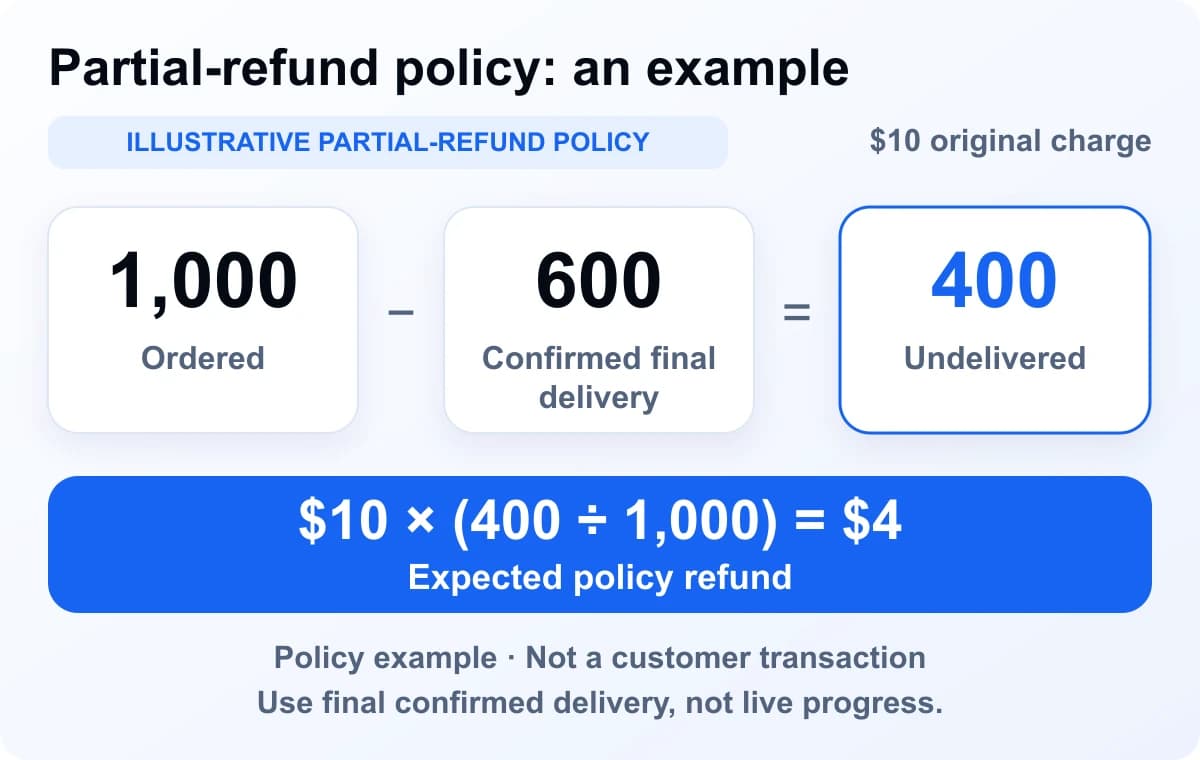
Compare the expected policy amount with the refund recorded for your order and its Wallet credit. If they differ, ask support to reconcile the order against the policy. Include the order reference, original charge, confirmed final delivery count and refund you can see. The support steps below explain how to report a discrepancy.
A live progress count can still change and is not a final settlement or proof of a refund credit. If the final delivery count is unclear or disputed, ask support to check the evidence. If the order remains unresolved, its eligible seven-day protection keeps the original deadline.
Do I always have to wait seven days?
No: a confirmed earlier cancellation or refund can settle sooner. An order proven not to have been submitted can qualify for an earlier refund. A Partially completed result follows the partial-delivery rule. The seven-day protection handles eligible orders that have not reached a final outcome.
A submission problem does not always mean a final outcome. An order may keep its current status while another attempt or an investigation is needed. Check the actual status and credited refund, and use the non-delivery policy for the applicable terms.
A completed order that later loses engagement follows the service's separate refill conditions, including any available refill period and exclusions. Completion does not turn a later drop into an unresolved seven-day order. A “No Refill” label, however, does not remove the automatic cancellation, partial-delivery or unresolved-order refunds that the policy expressly guarantees.
Where can I see a Wallet refund?
- Open the order in Orders. When a positive refund has been credited, its details show Refunded to your balance with the credited total.
- Open Wallet and check Recent transactions. Use the Refunds filter to find refund credits, and match the available order reference or description.
- Compare the original debit and refund credits. A $10 order debit followed by a $4 refund credit leaves $6 spent on that order, assuming no other settlement. Your overall balance can also change because of other purchases or deposits.

What if the refund does not match the policy?
The Refund Policy promises automatic Wallet refunds under the rules above. If an eligible refund is missing, late or smaller than the policy calculation, refresh the order and Wallet transaction history, then report the discrepancy. Open Support → New Ticket, choose Order and select the order. Ask support to reconcile the refund against the policy.
Read the support guide for follow-up instructions. A reply acknowledging the issue is separate from a confirmed refund credit.
What changes for drip-feed orders?
An ordinary Speed (drip-feed) order keeps the 15-second cancellation window and seven-day unresolved-order protection. New Speed schedules must fit NotPanel’s 48-hour schedule limit. NotPanel’s limit does not promise completion within 48 hours, and it does not move the original refund deadline.
For API integrations and resellers
Use the order-status documentation: for a Canceled or Partially completed order, the status reply includes the refunded amount, so no separate call is needed. Reading a status does not cancel an order or issue a refund. The cancellation documentation defines the order-specific deadline and how to confirm a successful result.
More questions about refund eligibility
Does this protection apply only to my first order?
No. Eligibility depends on the order and the applicable rule, not whether it is your first purchase. Eligible one-time orders placed through the website or API, including ordinary drip-feed orders, receive the ordinary cancellation and unresolved-order protections.
What if I supplied a wrong link or changed my account settings?
Contact support with the order reference and what changed. Incorrect links, private accounts, deleted content and changed usernames can affect delivery, refills and discretionary remedies. Those conditions do not override an automatic cancellation, partial-delivery or seven-day unresolved-order refund expressly guaranteed by the Refund Policy.
What happens if delivery arrives after the seven-day refund?
Later delivery does not reverse or re-debit the ordinary order's seven-day Wallet refund. NotPanel absorbs that later fulfillment cost. Check the recorded refund and Wallet transaction; the protection does not require you to pay the refunded order charge again.
Order charges and deposits are separate. Review the Wallet and deposit terms, including applicable exceptions, before adding funds. The pricing guide explains account pricing. Refund protection does not guarantee platform compliance, account standing, retention or business results; those remain subject to the Terms of Service and the relevant platform's rules.
NotPanel product guide, checked against the published Refund Policy on 10 October 2026. Examples are illustrative, and the Wallet image is a labeled product demonstration. The Refund Policy contains the governing terms.